
Nissan Rogue (T33) 2021-Present Owner’s Manual & User Guide: Driving the vehicle
Continuously Variable Transmission (CVT)
Basic information
The CVT in the Nissan Rogue is electronically controlled to deliver smooth, efficient performance. Following the recommended driving procedures ensures optimal response and longevity.
The system may reduce engine power automatically to protect the CVT if excessive wheel slip is detected on slippery surfaces.
WARNING
- Do not press the accelerator while shifting from P or N to R, D, or M. Keep the brake pedal pressed until shifting is complete.
- Idle speed is high when the engine is cold. Use caution when shifting into gear before warm-up.
- Avoid abrupt downshifting on slippery roads—this may cause a loss of control.
- Never shift to P or R while moving forward, or to P or D while reversing. This may damage the transmission.
- Avoid coasting in N while driving unless necessary. This can damage the transmission.
CAUTION
- On hills, do not hold the vehicle using the accelerator pedal. Use the brake pedal to prevent CVT damage.
- Do not hang items on the shift lever—this may cause unintended movement.
Starting the vehicle
1. After starting the engine, firmly press the brake pedal before shifting out of P (Park). Your Nissan Rogue is designed so the brake must be pressed before selecting a drive position when the ignition is ON. If the ignition is OFF, shifting out of P is not possible.
This ensures safe operation and prevents accidental vehicle movement.
2. Keep the foot brake pedal depressed and move the shift lever into a driving position.
3. Release the parking brake and the foot brake pedal, then gradually begin moving the vehicle.
CAUTION
- DEPRESS THE FOOT BRAKE PEDAL — Shifting the lever to D (Drive), R (Reverse), or M (Manual shift mode) without holding the brake may cause unintended movement. Always ensure the brake pedal is fully pressed before shifting.
- CHECK THE SHIFT LEVER POSITION — Make sure the selected gear is correctly shown on the vehicle information display. Use D (Drive) or M (Manual shift mode) to move forward, and R (Reverse) to back up.
- WARM UP THE ENGINE — Higher idle speed when cold can cause sudden movement. Shift carefully immediately after starting the Nissan Rogue.
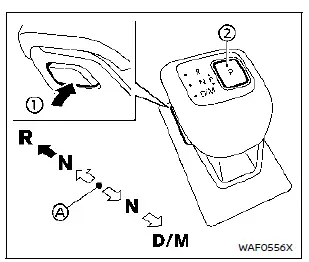
- Home position (central position)
Shifting
To move the shift lever:
 : Push button 1 to shift.
 : Shift without pressing button 1.
How to select each position:
The ignition must be ON and the brake pedal depressed.
- Shift to PARK
Press the park button 2. - Shift to REVERSE
- Press the shift lever button 1.
- Move the lever from home position to R.
- Shift to NEUTRAL
- From P (Park): Pull back or push forward one step from home without pressing the button, hold until N illuminates.
- From R (Reverse): Pull back one step and hold until N displays.
- From D (Drive): Push forward one step and hold until N displays.
WARNING
Apply the electronic parking brake if the Nissan Rogue is left in any gear while the engine is off. Failing to do so may cause unexpected movement.
CAUTION
- Use P, R, or D only when the vehicle is fully stopped.
- After shifting, verify that the lever returns to the center position. Holding it mid-way may damage the system.
- Do not shift while the accelerator is pressed. Sudden movement may occur.
- The following actions apply excessive force and may damage the transmission:
- Shifting into R while moving forward
- Shifting into D while reversing
If these actions are attempted, a chime will sound and the vehicle will switch to N (Neutral).
P (Park):
CAUTION
- Engage P only when fully stopped.
- Do not slide the lever while pressing the park button—this may damage the mechanism.
Use P when parked or starting the engine. Always stop completely before pressing the park button. For best safety on the Nissan Rogue, keep the brake pedal pressed while engaging P. Use P together with the electronic parking brake, especially on hills.
If a system fault occurs, the transmission may lock in P. Have the vehicle inspected promptly.
The P position will engage automatically if:
- The ignition is turned OFF.
- The driver unfastens the seat belt and opens the door at low speed while the vehicle is in D, R, or N (unless Neutral Hold is active).
CAUTION
To prevent CVT malfunction, manually shift to P when possible under these conditions.
R (Reverse):
CAUTION
Use R only when fully stopped.
Select R to back up. Ensure the Nissan Rogue is fully stopped, press the brake, and press the shift lever button. If R is selected while moving forward, the vehicle will chime and automatically shift to N.
N (Neutral):
No drive gear is engaged. The engine can be started in N. You may also shift to N to restart a stalled engine while moving.
You can select this position by holding the shift lever for about 0.5 seconds.
D (Drive):
Use this position for all normal forward driving. The CVT automatically adjusts gear ratios for smooth performance in the Nissan Rogue.
If D is selected while reversing, the chime will sound and the transmission will switch to N (Neutral).
Neutral hold mode function
This function allows the engine to be turned off while the Nissan Rogue remains in N (Neutral). It is useful during car washing, as the vehicle can be pushed even with the ignition OFF. Be sure to release the electronic parking brake before using this mode.
WARNING
- Use this function only on level ground to prevent unintended vehicle movement.
- Do not apply this feature for anything other than car washing.
- After activating the mode, pressing the brake is required to stop the Nissan Rogue since the vehicle stays in Neutral.
- If the mode does not activate correctly, the transmission may be malfunctioning. Have the vehicle inspected by a NISSAN dealer.
To activate Neutral hold mode:
1. Start the engine using the ignition switch.
2. Release the electronic parking brake.
3. Press and hold the brake pedal.
4. Press the P position switch.
5. Move the shift lever to N and hold for ~0.5 seconds until “N� appears on the display.
6. Slide the lever to N again and hold for ~0.5 seconds until “Neutral Hold Mode has been activated� appears.
7. Turn the ignition OFF—while staying in N.
To exit Neutral hold mode, shift to any position other than N.
NOTE:
- Steps 4–6 must be performed within about 5 seconds.
- When the ignition is turned OFF while still in N, a reminder message appears.
- If unavailable, wait briefly and repeat the procedure.
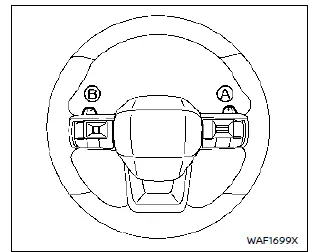
Paddle shifter
Manual shift mode
When the shift lever is moved to D while driving, manual shift mode becomes available. The paddle shifters on the steering wheel allow you to manually select shift ranges for a more controlled driving experience in the Nissan Rogue.
Pull the right paddle (+) to upshift. Pull the left paddle (−) to downshift.
To cancel manual mode, move the lever to D again. Temporary manual shifting is also possible by pulling a paddle while in D. The system automatically returns to Drive after a short period, or immediately if a paddle is held for ~1.5 seconds.
The selected shift range appears in the vehicle information display.

Shift ranges:
8M: For normal high-speed driving.
7M–5M: Useful for long uphill climbs or engine braking downhill.
4M–2M: For stronger engine braking or hill driving.
1M: For steep hills, deep snow, or maximum braking force.
- Avoid prolonged high-speed driving in lower gears to maintain fuel economy.
- Pulling a paddle twice will shift two ranges unless done too rapidly.
- The system may prevent shifts that could damage the Nissan Rogue or reduce stability.
- If this occurs, the CVT indicator will blink and a chime will sound.
- In manual mode, the CVT may automatically upshift if engine speed is too high.
- If the CVT fluid is extremely cold, manual mode may be restricted until warmed.
- High CVT temperatures may cause earlier upshifts; this is normal.
Accelerator downshift — D position
For passing or hill climbing, fully depress the accelerator pedal. The Nissan Rogue will automatically downshift to a lower gear based on speed.
High fluid temperature protection mode
The Continuously Variable Transmission in the Nissan Rogue features a high fluid temperature protection mode. When transmission fluid becomes excessively hot — such as during steep hill climbs, towing heavy loads, or driving in high ambient temperatures — the system automatically reduces engine power and may limit vehicle speed. This helps protect the transmission from damage. Vehicle speed can still be controlled with the accelerator, but overall performance may be temporarily reduced.
Fail-safe
Under certain conditions, the fail-safe system may activate to protect the Nissan Rogue transmission. When this occurs, the CVT may refuse to shift into the selected driving position.
If the vehicle experiences extreme situations — such as prolonged wheel spinning followed by sudden hard braking — fail-safe mode may be triggered.
The Malfunction Indicator Light (MIL) may illuminate to indicate that fail-safe mode has been activated. This can occur even when all electrical components are functioning correctly. To reset the system, turn the ignition OFF, wait 10 seconds, then turn it back ON. The Nissan Rogue should return to normal operation. If it does not, the transmission should be inspected by a NISSAN dealer.
WARNING
If high fluid temperature protection mode or fail-safe operation is activated, vehicle speed may decrease gradually. Reduced speed may be significantly slower than surrounding traffic and can increase the risk of a collision.
Drive with increased caution, and if needed, safely pull over to allow the Nissan Rogue transmission to cool down or be inspected.
Other materials:
Window washer fluid
Type A (if so equipped)
Type B (if so equipped)
For Type A systems on the Nissan Rogue, check the washer reservoir directly and refill with washer fluid when the level gets low.
For Type B systems, plug the center hole A of the cap/tube assembly with your finger and remove it from the re ...
Flasher
CONSULT Function (BCM - FLASHER)
DATA MONITORNOTE:
The following table includes information (items)
inapplicable to this Nissan Ariya vehicle. For information (items)
applicable to this vehicle, refer to CONSULT display items.
Monitor item
[Unit] Description
Hazard switch
[Off/On]
...
Aluminum Repair
Sheet Metal Work (aluminum)
Sheet Metal Work (Aluminum)
Repairing aluminum alloy panels is basically the same as repairing
steel panels. Special considerations for repairing aluminum alloy are
listed below.
Sanding
Aluminum alloy panels are softer than steel plates. It is important
to se ...