
Nissan Rogue (T33) 2021-Present Service Manual: Diagnosis and Repair Workflow
Intelligent Around View Monitor
Work Flow
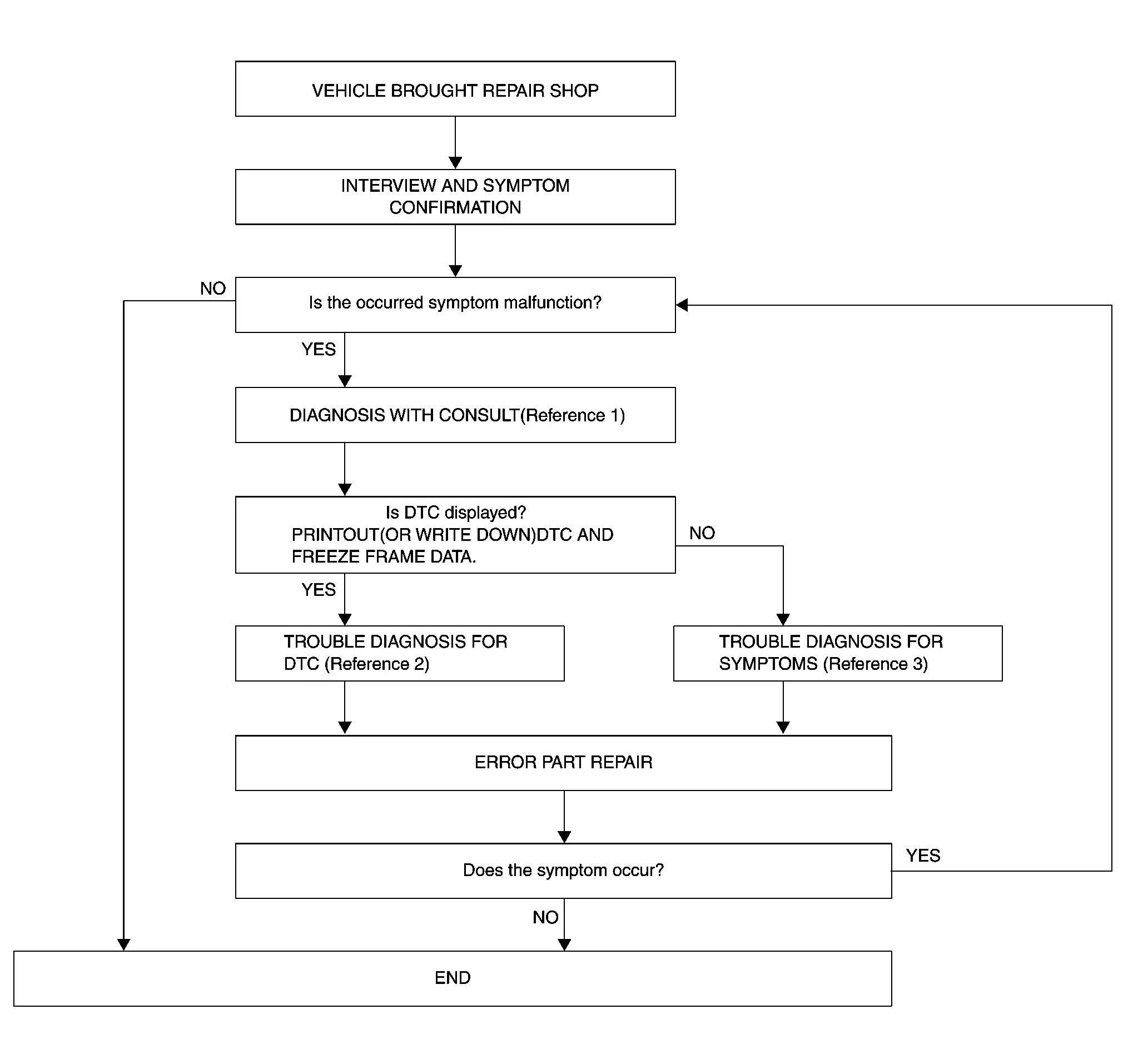
OVERALL SEQUENCE
-
Reference 1··· Refer to Consult Function.
-
Reference 2··· Refer to DTC Index.
-
Reference 3··· Refer to Symptom Table.
DETAILED FLOW
INTERVIEW AND SYMPTOM CONFIRMATION
Check the malfunction symptoms by performing the following items.
-
Interview the customer to obtain the malfunction information (conditions and environment when the malfunction occurred).
-
Check the symptom.
Is the occurred symptom malfunction?
YES>>GO TO 2.
NO>>INSPECTION END
DIAGNOSIS WITH CONSULT
-
Connect CONSULT and perform a self-diagnosis for “AVM�. Refer to Consult Function.
 NOTE:
NOTE:
Skip to step 4 of the diagnosis procedure if “AVM� is not displayed.
-
When DTC is detected, follow the instructions below:
-
Record DTC and Freeze Frame Data.
-
Is DTC displayed?
YES>>GO TO 3.
NO>>GO TO 4.
TROUBLE DIAGNOSIS FOR DTC
-
Check the DTC indicated in the “Self-Diagnosis Results�.
-
Perform the relevant diagnosis referring to the DTC Index. Refer to DTC Index.
>>
GO TO 5.
TROUBLE DIAGNOSIS FOR SYMPTOMS
Perform the relevant diagnosis referring to the diagnosis chart by symptom. Refer to Symptom Table
>>
GO TO 5.
ERROR PART REPAIR
-
Repair or replace the identified malfunctioning parts.
-
Perform a self-diagnosis for “AVM� with CONSULT.
NOTE:
Erase the stored self-diagnosis results after repairing or replacing the relevant components if any DTC has been indicated in the “Self-Diagnosis Results�.
-
Check that the symptom does not occur.
Does the symptom occur?
YES>>GO TO 1.
NO>>INSPECTION END
Other materials:
Symptom Diagnosis. Squeak and Rattle Trouble Diagnoses
Work Flow
CUSTOMER INTERVIEWInterview
the customer if possible, to determine the conditions that exist when
the noise occurs. Use the Diagnostic Worksheet during the interview to
document the facts and conditions when the noise occurs and any of
customer's comments. Refer to Diagnostic Work ...
Symptom Diagnosis. Door Mirror Does Not Operate
Diagnosis Procedure (Without automatic drive positioner system)
CHECK DOOR MIRROR CIRCUIT
Check door mirror. Refer to Diagnosis Procedure.
Is the inspection result normal?
YES>>
GO TO 2.
NO>>
Repair or replace the malfunctioning parts.
REPLACE DOOR MIRROR MOTOR
Replace door mi ...
Removal and Installation. Steering Gear and Linkage
Exploded View
1.
Outer socket
2.
Boot clamp (small diameter)
3.
Boot
4.
Boot clamp (large diameter)
5.
Hole cover seal
A.
Outer socket lock nut.
B.
Inner socket lock nut.
—
—
—
—
CAUTION:
Never apply the grease to the surface be ...